mat1 <- matrix(1:16,nrow=4)
mat1
[,1] [,2] [,3] [,4]
[1,] 1 5 9 13
[2,] 2 6 10 14
[3,] 3 7 11 15
[4,] 4 8 12 16A matrix is a rectangular collection of the same data type (see Figure 9.1). It can be viewed as a collection of column vectors all of the same length and the same type (i.e. numeric, character or logical) OR a collection of row vectors, again all of the same type and length. A data.frame is also a rectangular array. All of the columns must be the same length, but they may be of different types. The rows and columns of a matrix or data frame can be given names. However these are implemented differently in R; many operations will work for one but not both, often a source of confusion.
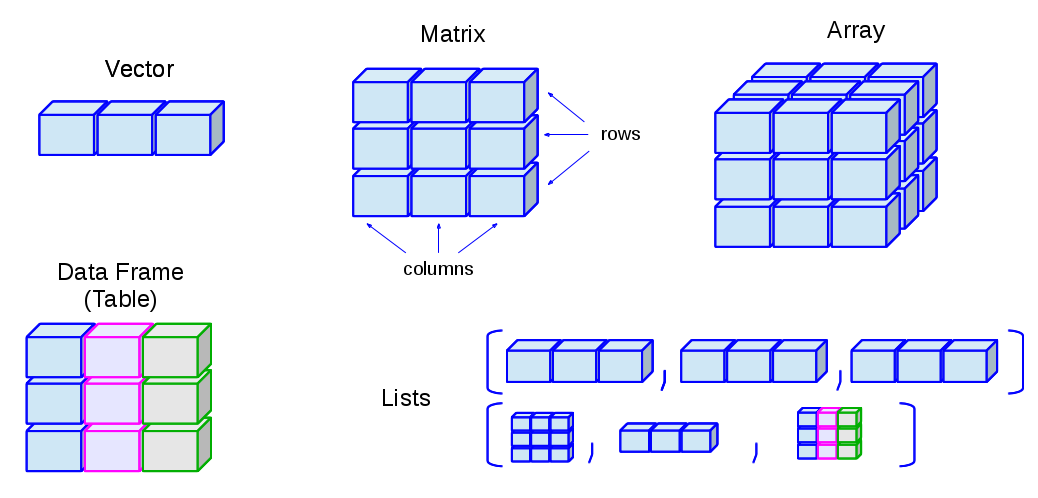
There are many ways to create a matrix in R. One of the simplest is to use the matrix() function. In the code below, we’ll create a matrix from a vector from 1:16.
mat1 <- matrix(1:16,nrow=4)
mat1 [,1] [,2] [,3] [,4]
[1,] 1 5 9 13
[2,] 2 6 10 14
[3,] 3 7 11 15
[4,] 4 8 12 16The same is possible, but specifying that the matrix be “filled” by row.
mat1 <- matrix(1:16,nrow=4,byrow = TRUE)
mat1
[,1] [,2] [,3] [,4]
[1,] 1 2 3 4
[2,] 5 6 7 8
[3,] 9 10 11 12
[4,] 13 14 15 16Notice the subtle difference in the order that the numbers go into the matrix.
We can also build a matrix from parts by “binding” vectors together:
x <- 1:10
y <- rnorm(10)
Each of the vectors above is of length 10 and both are “numeric”, so we can make them into a matrix. Using rbind binds rows (r) into a matrix.
mat <- rbind(x,y)
mat
[,1] [,2] [,3] [,4] [,5] [,6] [,7]
x 1.000000 2.000000 3.0000000 4.0000000 5.000000 6.000000 7.000000000
y -1.325599 2.625988 -0.5995257 0.2640878 1.066886 1.026504 0.007406872
[,8] [,9] [,10]
x 8.0000000 9.000000 10.000000
y 0.9496984 1.374093 1.862218The alternative to rbind is cbind that binds columns (c) together.
mat <- cbind(x,y)
mat
x y
[1,] 1 -1.325598661
[2,] 2 2.625987528
[3,] 3 -0.599525738
[4,] 4 0.264087823
[5,] 5 1.066885781
[6,] 6 1.026504421
[7,] 7 0.007406872
[8,] 8 0.949698364
[9,] 9 1.374092714
[10,] 10 1.862218163Inspecting the names associated with rows and columns is often useful, particularly if the names have human meaning.
rownames(mat)NULLcolnames(mat)[1] "x" "y"We can also change the names of the matrix by assigning valid names to the columns or rows.
colnames(mat) = c('apples','oranges')
colnames(mat)
[1] "apples" "oranges"mat apples oranges
[1,] 1 -1.325598661
[2,] 2 2.625987528
[3,] 3 -0.599525738
[4,] 4 0.264087823
[5,] 5 1.066885781
[6,] 6 1.026504421
[7,] 7 0.007406872
[8,] 8 0.949698364
[9,] 9 1.374092714
[10,] 10 1.862218163Matrices have dimensions.
dim(mat)[1] 10 2nrow(mat)[1] 10ncol(mat)[1] 2Indexing for matrices works as for vectors except that we now need to include both the row and column (in that order). We can access elements of a matrix using the square bracket [ indexing method. Elements can be accessed as var[r, c]. Here, r and c are vectors describing the elements of the matrix to select.
The indices in R start with one, meaning that the first element of a vector or the first row/column of a matrix is indexed as one.
This is different from some other programming languages, such as Python, which use zero-based indexing, meaning that the first element of a vector or the first row/column of a matrix is indexed as zero.
It is important to be aware of this difference when working with data in R, especially if you are coming from a programming background that uses zero-based indexing. Using the wrong index can lead to unexpected results or errors in your code.
# The 2nd element of the 1st row of mat
mat[1,2]
oranges
-1.325599 # The first ROW of mat
mat[1,] apples oranges
1.000000 -1.325599 # The first COLUMN of mat
mat[,1] [1] 1 2 3 4 5 6 7 8 9 10# and all elements of mat that are > 4; note no comma
mat[mat>4][1] 5 6 7 8 9 10## [1] 5 6 7 8 9 10Note that in the last case, there is no “,”, so R treats the matrix as a long vector (length=20). This is convenient, sometimes, but it can also be a source of error, as some code may “work” but be doing something unexpected.
We can also use indexing to exclude a row or column by prefixing the selection with a - sign.
mat[,-1] # remove first column [1] -1.325598661 2.625987528 -0.599525738 0.264087823 1.066885781
[6] 1.026504421 0.007406872 0.949698364 1.374092714 1.862218163mat[-c(1:5),] # remove first five rows apples oranges
[1,] 6 1.026504421
[2,] 7 0.007406872
[3,] 8 0.949698364
[4,] 9 1.374092714
[5,] 10 1.862218163We can create a matrix filled with random values drawn from a normal distribution for our work below.
m = matrix(rnorm(20),nrow=10)
summary(m)
V1 V2
Min. :-1.4939 Min. :-1.2081
1st Qu.:-0.9215 1st Qu.:-0.6468
Median :-0.1318 Median : 0.1367
Mean :-0.0953 Mean : 0.1488
3rd Qu.: 0.3056 3rd Qu.: 0.5619
Max. : 2.0916 Max. : 2.4685 Multiplication and division works similarly to vectors. When multiplying by a vector, for example, the values of the vector are reused. In the simplest case, let’s multiply the matrix by a constant (vector of length 1).
# multiply all values in the matrix by 20
m2 = m*20
summary(m2)
V1 V2
Min. :-29.879 Min. :-24.161
1st Qu.:-18.430 1st Qu.:-12.936
Median : -2.637 Median : 2.733
Mean : -1.906 Mean : 2.976
3rd Qu.: 6.112 3rd Qu.: 11.239
Max. : 41.833 Max. : 49.370 By combining subsetting with assignment, we can make changes to just part of a matrix.
# and add 100 to the first column of m
m2[,1] = m2[,1] + 100
# summarize m
summary(m2)
V1 V2
Min. : 70.12 Min. :-24.161
1st Qu.: 81.57 1st Qu.:-12.936
Median : 97.36 Median : 2.733
Mean : 98.09 Mean : 2.976
3rd Qu.:106.11 3rd Qu.: 11.239
Max. :141.83 Max. : 49.370 A somewhat common transformation for a matrix is to transpose which changes rows to columns. One might need to do this if an assay output from a lab machine puts samples in rows and genes in columns, for example, while in Bioconductor/R, we often want the samples in columns and the genes in rows.
t(m2) [,1] [,2] [,3] [,4] [,5] [,6] [,7]
[1,] 97.54502 70.121171 118.95653 141.832989 89.824526 105.547895 78.81841
[2,] 13.11580 2.993531 49.36978 2.472511 5.607523 -6.200718 -15.18058
[,8] [,9] [,10]
[1,] 106.30054 97.18116 74.81129
[2,] 21.36702 -19.62368 -24.16138Again, we just need a matrix to play with. We’ll use rnorm again, but with a slight twist.
m3 = matrix(rnorm(100,5,2),ncol=10) # what does the 5 mean here? And the 2?Since these data are from a normal distribution, we can look at a row (or column) to see what the mean and standard deviation are.
mean(m3[,1])[1] 5.549797sd(m3[,1])[1] 1.541549# or a row
mean(m3[1,])[1] 3.608359sd(m3[1,])[1] 1.647011There are some useful convenience functions for computing means and sums of data in all of the columns and rows of matrices.
colMeans(m3) [1] 5.549797 4.505066 5.083448 4.682110 5.265026 5.246739 3.614876 5.350698
[9] 5.049795 5.036546rowMeans(m3) [1] 3.608359 5.881085 5.650431 5.844686 4.932823 5.843897 4.052513 3.870038
[9] 5.298616 4.401653rowSums(m3) [1] 36.08359 58.81085 56.50431 58.44686 49.32823 58.43897 40.52513 38.70038
[9] 52.98616 44.01653colSums(m3) [1] 55.49797 45.05066 50.83448 46.82110 52.65026 52.46739 36.14876 53.50698
[9] 50.49795 50.36546We can look at the distribution of column means:
# save as a variable
cmeans = colMeans(m3)
summary(cmeans)
Min. 1st Qu. Median Mean 3rd Qu. Max.
3.615 4.771 5.067 4.938 5.260 5.550 Note that this is centered pretty closely around the selected mean of 5 above.
How about the standard deviation? There is not a colSd function, but it turns out that we can easily apply functions that take vectors as input, like sd and “apply” them across either the rows (the first dimension) or columns (the second) dimension.
csds = apply(m3, 2, sd)
summary(csds)
Min. 1st Qu. Median Mean 3rd Qu. Max.
1.542 1.798 1.915 2.047 2.214 2.699 Again, take a look at the distribution which is centered quite close to the selected standard deviation when we created our matrix.
For this set of exercises, we are going to rely on a dataset that comes with R. It gives the number of sunspots per month from 1749-1983. The dataset comes as a ts or time series data type which I convert to a matrix using the following code.
Just run the code as is and focus on the rest of the exercises.
data(sunspots)
sunspot_mat <- matrix(as.vector(sunspots),ncol=12,byrow = TRUE)
colnames(sunspot_mat) <- as.character(1:12)
rownames(sunspot_mat) <- as.character(1749:1983)After the conversion above, what does sunspot_mat look like? Use functions to find the number of rows, the number of columns, the class, and some basic summary statistics.
ncol(sunspot_mat)
nrow(sunspot_mat)
dim(sunspot_mat)
summary(sunspot_mat)
head(sunspot_mat)
tail(sunspot_mat)
Practice subsetting the matrix a bit by selecting:
sunspot_mat[1:10,]
sunspot_mat[,7]
sunspot_mat['1979',7]
These next few exercises take advantage of the fact that calling a univariate statistical function (one that expects a vector) works for matrices by just making a vector of all the values in the matrix. What is the highest (max) number of sunspots recorded in these data?
max(sunspot_mat)And the minimum?
min(sunspot_mat)And the overall mean and median?
mean(sunspot_mat)
median(sunspot_mat)
Use the hist() function to look at the distribution of all the monthly sunspot data.
hist(sunspot_mat)Read about the breaks argument to hist() to try to increase the number of breaks in the histogram to increase the resolution slightly. Adjust your hist() and breaks to your liking.
hist(sunspot_mat, breaks=40)Now, let’s move on to summarizing the data a bit to learn about the pattern of sunspots varies by month or by year. Examine the dataset again. What do the columns represent? And the rows?
# just a quick glimpse of the data will give us a sense
head(sunspot_mat)
We’d like to look at the distribution of sunspots by month. How can we do that?
# the mean of the columns is the mean number of sunspots per month.
colMeans(sunspot_mat)

# Another way to write the same thing:
apply(sunspot_mat, 2, mean)
Assign the month summary above to a variable and summarize it to get a sense of the spread over months.
monthmeans = colMeans(sunspot_mat)
summary(monthmeans)
Play the same game for years to get the per-year mean?
ymeans = rowMeans(sunspot_mat)
summary(ymeans)
Make a plot of the yearly means. Do you see a pattern?
plot(ymeans)
# or make it clearer
plot(ymeans, type='l')